---
title: CE Credit Information
description: Here you will see the name of the courses/events, earned date, approved date, and other details
---
[Skip to content](https://hub.talenteverywhere.org/knowledge/ce-credit-information#main-content)
English
Show submenu for translations
![WERC\_Tagline\_REV.png\]](https://hub.talenteverywhere.org/hs-fs/hubfs/WERC_Tagline_REV.png?height=40&name=WERC_Tagline_REV.png)
Open main navigation
Close main navigation
- English
Show submenu for translations
How can we help?
- There are no suggestions because the search field is empty.
1. [Help Center](https://hub.talenteverywhere.org/knowledge?hsLang=en)
2. [Education & Learning](https://hub.talenteverywhere.org/knowledge/education-learning?hsLang=en)
# CE Credit Information
## Here you will see the name of the courses/events, earned date, approved date, and other details
CE credits for all Worldwide ERC activities will be automatically uploaded to your record within two-weeks after the event ends, based on your attendance. You do not need to manually add them.
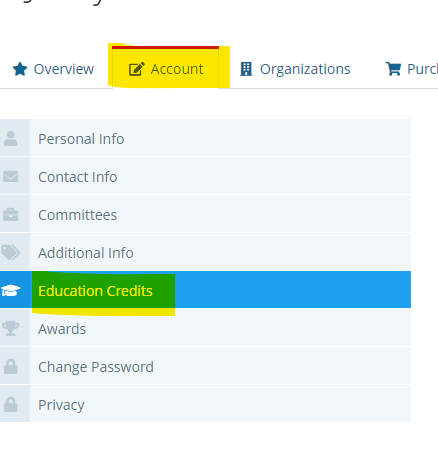
To check your transcript and add credits to your profile, in your account, click "Account," then "Education Credits."
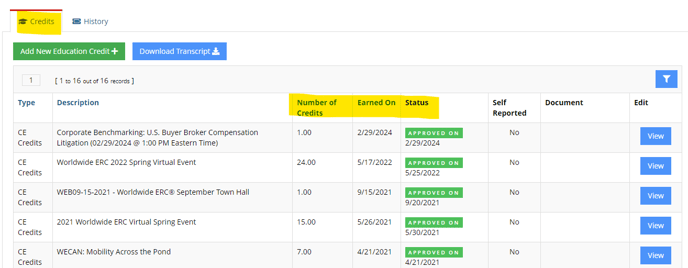
Here, you will see pending, approved, and declined credits - this information will be indicated in the "Status" column.
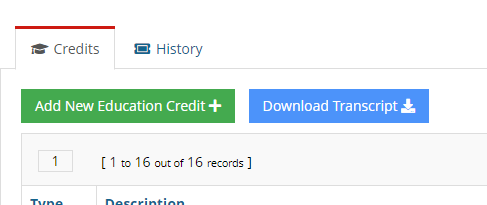
You may download your transcript from this page using the blue "Download Transcript" button towards the top of the page.
You can manually add NON-WERC credits to your record by taking the following steps: click "Add New Education Credit," then click the dropdown menu and choose "CE Credits," fill in the required fields.
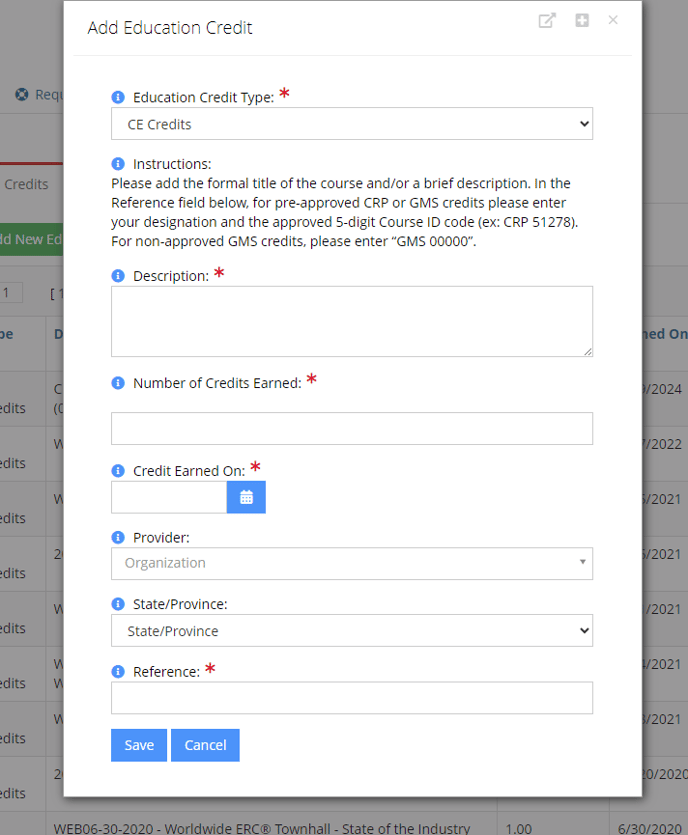
In the "Description" section, please add the**title** of the **pre-approved** event or course. If you are adding a non-pre-approved event or course to apply to your GMS certification, please provide a **description outlining the content** of the event to expedite the approval process. If the content does not fulfill the GMS course criteria, it will be declined (criteria can be found [here](https://www.talenteverywhere.org/Certification/Global-Mobility-Specialist/How-to-Retain-the-GMS-T-Certification)).
**\*\*\*The reference ID is a 5-digit number assigned to our pre-approved courses and can be applied to both CRP and GMS, you do not have to enter the CE credit twice. Please include this 5-digit number to ensure the course is approved.\*\*\***
Please ensure all information such as the title, date earned (date of live event), and number of credits earned is correct. If you have documentation/recertification form with this information, please upload it to expedite the approval process. If information included in your report is incorrect, your CE credit will be declined.
Please feel free to refer to our [Help Center](https://20762520.hs-sites.com/knowledge?hsLang=en) for other inquiries.
- [Internal Support](https://hub.talenteverywhere.org/knowledge/internal-support?hsLang=en#main-content)
- [Tutorial](https://hub.talenteverywhere.org/knowledge/internal-support?hsLang=en#tutorial)
- [Membership](https://hub.talenteverywhere.org/knowledge/membership?hsLang=en#main-content)
- [Corporate Premier (HR) Membership](https://hub.talenteverywhere.org/knowledge/membership?hsLang=en#corporate-premier-hr-membership)
- [Professional/Personal (PERC™) Membership](https://hub.talenteverywhere.org/knowledge/membership?hsLang=en#professional-personal-perc-membership)
- [Service Provider Memberships](https://hub.talenteverywhere.org/knowledge/membership?hsLang=en#service-provider-memberships)
- [Membership FAQs](https://hub.talenteverywhere.org/knowledge/membership?hsLang=en#membership-faqs)
- [Education & Learning](https://hub.talenteverywhere.org/knowledge/education-learning?hsLang=en#main-content)
- [GMS Designation](https://hub.talenteverywhere.org/knowledge/education-learning?hsLang=en#gms-designation)
- [CRP Designation](https://hub.talenteverywhere.org/knowledge/education-learning?hsLang=en#crp-designation)
- [CRP/GMS](https://hub.talenteverywhere.org/knowledge/education-learning?hsLang=en#crp-gms)
- [Events](https://hub.talenteverywhere.org/knowledge/events?hsLang=en#main-content)
- [Regional Summit](https://hub.talenteverywhere.org/knowledge/events?hsLang=en#regional-summit)
- [Registration](https://hub.talenteverywhere.org/knowledge/events?hsLang=en#registration)
- [News, Research, & Public Policy](https://hub.talenteverywhere.org/knowledge/news-research-public-policy?hsLang=en)
- [Publications & Subscriptions](https://hub.talenteverywhere.org/knowledge/publications-subscriptions?hsLang=en)
- [Career Center](https://hub.talenteverywhere.org/knowledge/career-center?hsLang=en)
- [Advertising Opportunities](https://hub.talenteverywhere.org/knowledge/advertising-opportunities?hsLang=en)
- [Foundation of Workforce Mobility](https://hub.talenteverywhere.org/knowledge/foundation-of-workforce-mobility?hsLang=en)
- [Get Involved](https://hub.talenteverywhere.org/knowledge/get-involved?hsLang=en)
[](https://www.worldwideerc.org/)
WERC website
Copyright © 2026, WERC