---
title: Access and sign in to the Forms Portal
description: How to access forms portal
---
[Skip to content](https://hub.talenteverywhere.org/knowledge/how-to-access-the-forms-portal-subscription#main-content)
English
Show submenu for translations
![WERC\_Tagline\_REV.png\]](https://hub.talenteverywhere.org/hs-fs/hubfs/WERC_Tagline_REV.png?height=40&name=WERC_Tagline_REV.png)
Open main navigation
Close main navigation
- English
Show submenu for translations
How can we help?
- There are no suggestions because the search field is empty.
1. [Help Center](https://hub.talenteverywhere.org/knowledge?hsLang=en)
2. [Publications & Subscriptions](https://hub.talenteverywhere.org/knowledge/publications-subscriptions?hsLang=en)
# Access and sign in to the Forms Portal
## how to access forms in Forms Portal
**NOTE:** You must have purchased the Forms Portal Subscription to gain access. To purchase please visit, [https://www.talenteverywhere.org/Membership/Forms-Portal](https://www.talenteverywhere.org/Membership/Forms-Portal)
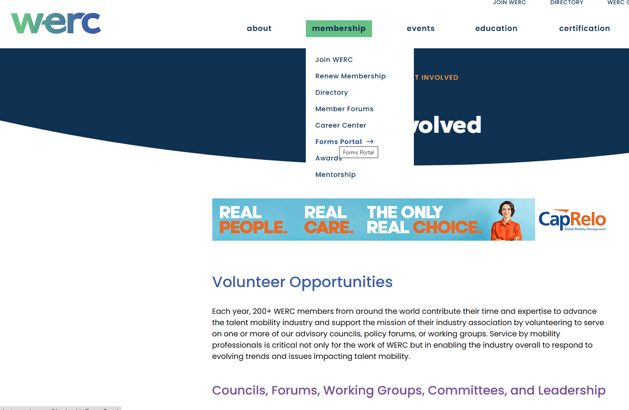
1. On the website, hover over "Membership" then click "Forms Portal".
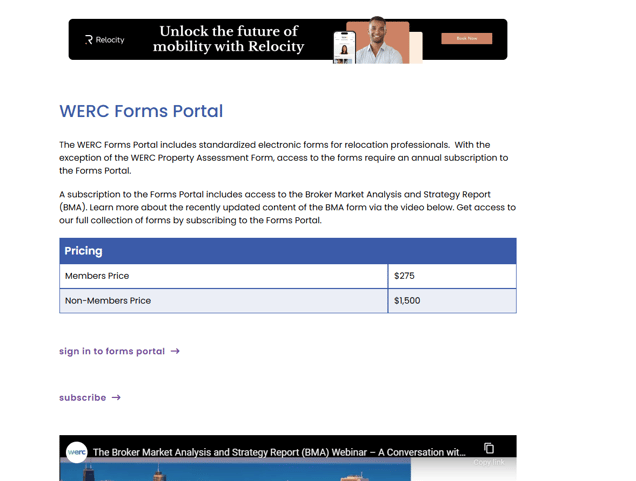
2\. Under the pricing block, click "SIGN IN TO FORMS PORTAL" and enter your WERC email and password.
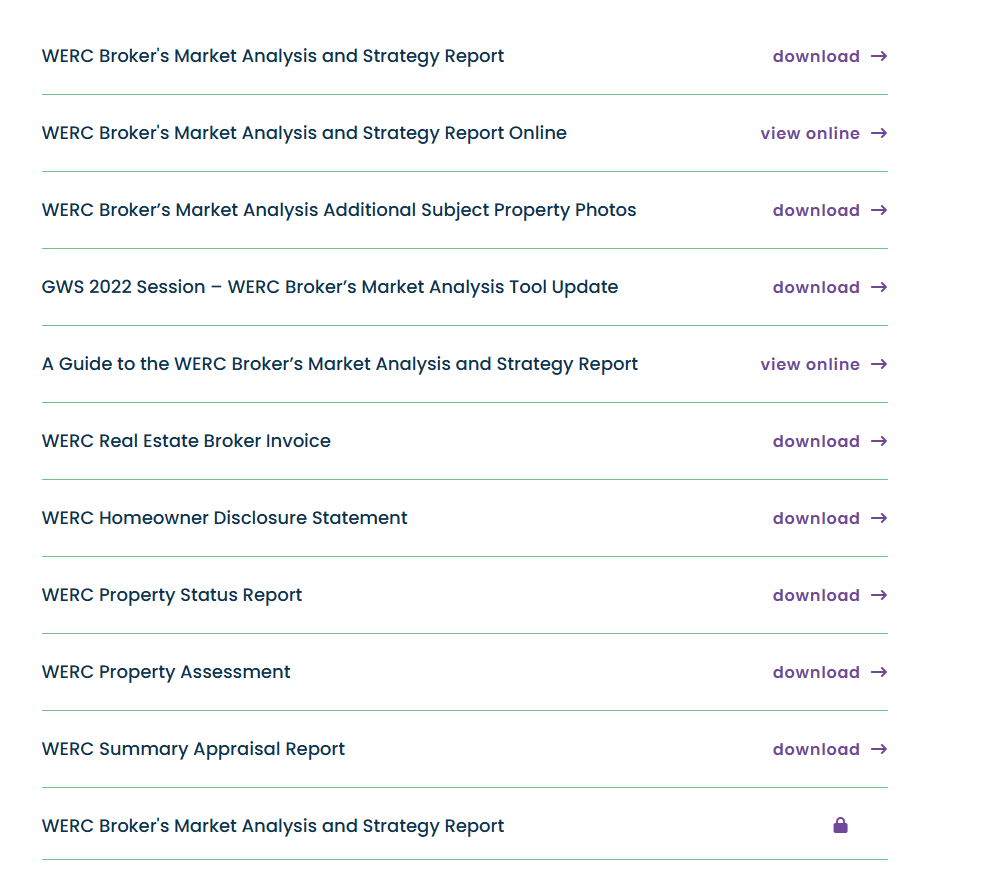
3. The page will appear to reload. Scroll all the way down to find the items unlocked and select the desired form.
- [Internal Support](https://hub.talenteverywhere.org/knowledge/internal-support?hsLang=en#main-content)
- [Tutorial](https://hub.talenteverywhere.org/knowledge/internal-support?hsLang=en#tutorial)
- [Membership](https://hub.talenteverywhere.org/knowledge/membership?hsLang=en#main-content)
- [Corporate Premier (HR) Membership](https://hub.talenteverywhere.org/knowledge/membership?hsLang=en#corporate-premier-hr-membership)
- [Professional/Personal (PERC™) Membership](https://hub.talenteverywhere.org/knowledge/membership?hsLang=en#professional-personal-perc-membership)
- [Service Provider Memberships](https://hub.talenteverywhere.org/knowledge/membership?hsLang=en#service-provider-memberships)
- [Membership FAQs](https://hub.talenteverywhere.org/knowledge/membership?hsLang=en#membership-faqs)
- [Education & Learning](https://hub.talenteverywhere.org/knowledge/education-learning?hsLang=en#main-content)
- [GMS Designation](https://hub.talenteverywhere.org/knowledge/education-learning?hsLang=en#gms-designation)
- [CRP Designation](https://hub.talenteverywhere.org/knowledge/education-learning?hsLang=en#crp-designation)
- [CRP/GMS](https://hub.talenteverywhere.org/knowledge/education-learning?hsLang=en#crp-gms)
- [Events](https://hub.talenteverywhere.org/knowledge/events?hsLang=en#main-content)
- [Regional Summit](https://hub.talenteverywhere.org/knowledge/events?hsLang=en#regional-summit)
- [Registration](https://hub.talenteverywhere.org/knowledge/events?hsLang=en#registration)
- [News, Research, & Public Policy](https://hub.talenteverywhere.org/knowledge/news-research-public-policy?hsLang=en)
- [Publications & Subscriptions](https://hub.talenteverywhere.org/knowledge/publications-subscriptions?hsLang=en)
- [Career Center](https://hub.talenteverywhere.org/knowledge/career-center?hsLang=en)
- [Advertising Opportunities](https://hub.talenteverywhere.org/knowledge/advertising-opportunities?hsLang=en)
- [Foundation of Workforce Mobility](https://hub.talenteverywhere.org/knowledge/foundation-of-workforce-mobility?hsLang=en)
- [Get Involved](https://hub.talenteverywhere.org/knowledge/get-involved?hsLang=en)
[](https://www.worldwideerc.org/)
WERC website
Copyright © 2026, WERC