---
title: How to Add CE Credits to My Profile
description: how to add ce credits
---
[Skip to content](https://hub.talenteverywhere.org/knowledge/how-to-add-crp/gms-ce-credits-to-my-profile#main-content)
English
Show submenu for translations
![WERC\_Tagline\_REV.png\]](https://hub.talenteverywhere.org/hs-fs/hubfs/WERC_Tagline_REV.png?height=40&name=WERC_Tagline_REV.png)
Open main navigation
Close main navigation
- English
Show submenu for translations
How can we help?
- There are no suggestions because the search field is empty.
1. [Help Center](https://hub.talenteverywhere.org/knowledge?hsLang=en)
2. [Education & Learning](https://hub.talenteverywhere.org/knowledge/education-learning?hsLang=en)
# How to Add CE Credits to My Profile
## You do not have to add CE credits twice if you hold more than one designation. It only needs to be entered once.
If you have a **5-digit code**, follow the instructions on this page: **[Adding Continuing Education Credits](https://www.talenteverywhere.org/Certification/Adding-Continuing-Education-Credits) .**If you are unsure if your code is pre-approved, reach out to the event host to confirm.
If your course **DOES NOT** have a pre-approved 5-digit code, please follow the below steps.
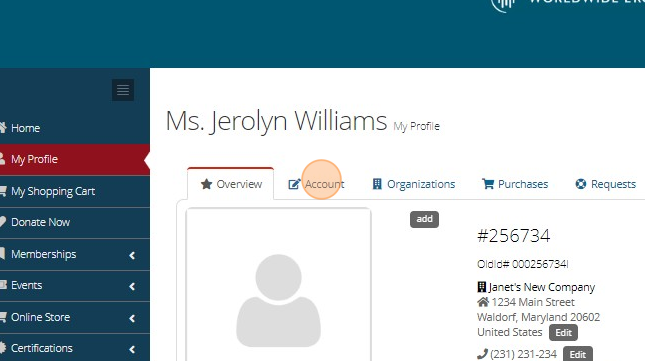
1\. Sign into our website (www.TalentEverywhere.org), click on "My Account" and click "Account"
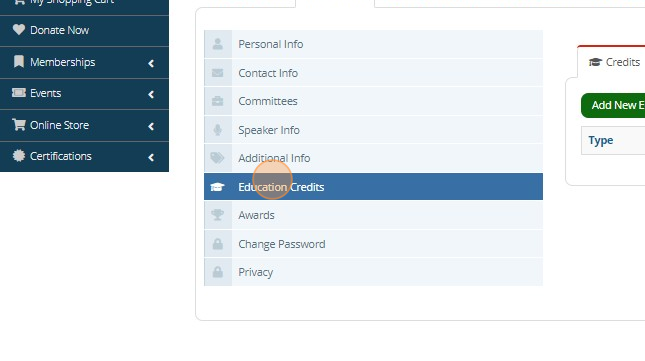
2\. Click "Education Credits"
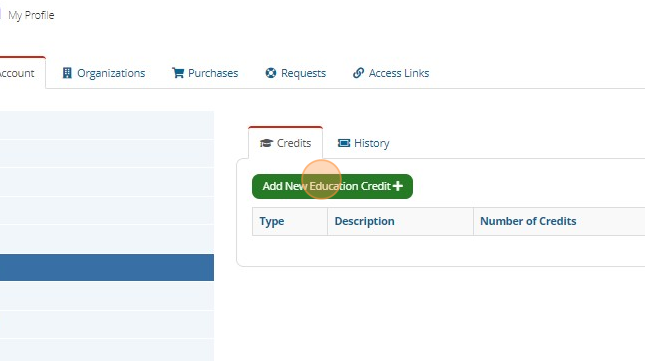
3\. Click "Add New Education Credit"
4. Click the dropdown and choose "CE Credits." Please add the formal title of the course and a description.
5\. Enter the number of credits earned. NOTE: If the credit amount is incorrect, we will not approve the credit request.
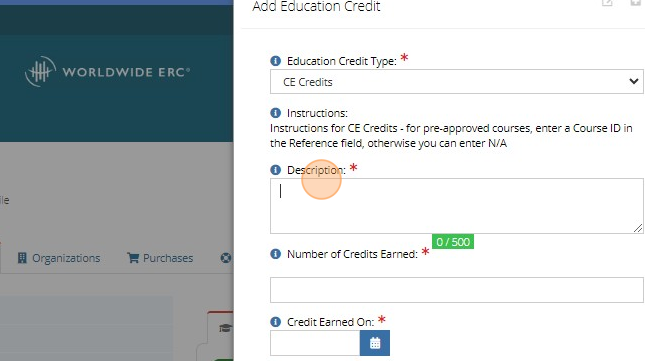
6\. Enter **the date that the event was held** in the "credit earned on" field.
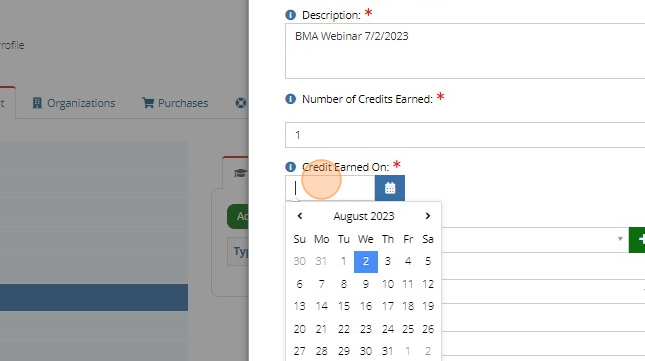
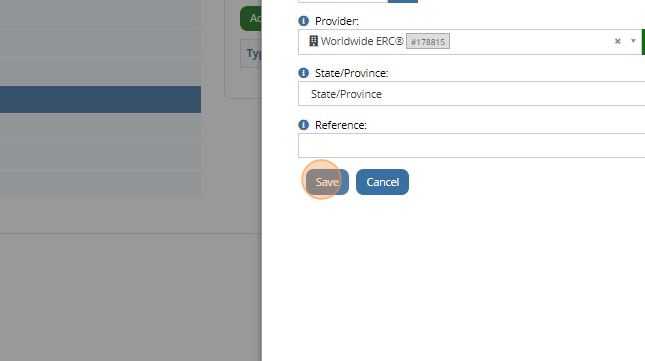
7\. In the reference field, please enter “GMS 00000”
8. And "Save". Your CE credit request has been entered and will be listed as pending for Worldwide ERC staff to review.
9. If you have additional information about the webinar/event/course, please upload to expedite the approval process, then click "Close"
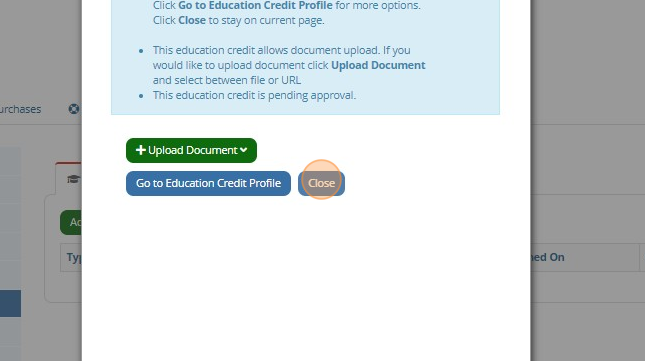
If any of the information provided on the "CE Credit Request" form is incorrect/incomplete, your CE credit request will be declined.
Did we answer your question? If not, please contact [CustomerSuccess@talenteverywhere.org](mailto:CustomerSuccess@talenteverywhere.org)
- [Internal Support](https://hub.talenteverywhere.org/knowledge/internal-support?hsLang=en#main-content)
- [Tutorial](https://hub.talenteverywhere.org/knowledge/internal-support?hsLang=en#tutorial)
- [Membership](https://hub.talenteverywhere.org/knowledge/membership?hsLang=en#main-content)
- [Corporate Premier (HR) Membership](https://hub.talenteverywhere.org/knowledge/membership?hsLang=en#corporate-premier-hr-membership)
- [Professional/Personal (PERC™) Membership](https://hub.talenteverywhere.org/knowledge/membership?hsLang=en#professional-personal-perc-membership)
- [Service Provider Memberships](https://hub.talenteverywhere.org/knowledge/membership?hsLang=en#service-provider-memberships)
- [Membership FAQs](https://hub.talenteverywhere.org/knowledge/membership?hsLang=en#membership-faqs)
- [Education & Learning](https://hub.talenteverywhere.org/knowledge/education-learning?hsLang=en#main-content)
- [GMS Designation](https://hub.talenteverywhere.org/knowledge/education-learning?hsLang=en#gms-designation)
- [CRP Designation](https://hub.talenteverywhere.org/knowledge/education-learning?hsLang=en#crp-designation)
- [CRP/GMS](https://hub.talenteverywhere.org/knowledge/education-learning?hsLang=en#crp-gms)
- [Events](https://hub.talenteverywhere.org/knowledge/events?hsLang=en#main-content)
- [Regional Summit](https://hub.talenteverywhere.org/knowledge/events?hsLang=en#regional-summit)
- [Registration](https://hub.talenteverywhere.org/knowledge/events?hsLang=en#registration)
- [News, Research, & Public Policy](https://hub.talenteverywhere.org/knowledge/news-research-public-policy?hsLang=en)
- [Publications & Subscriptions](https://hub.talenteverywhere.org/knowledge/publications-subscriptions?hsLang=en)
- [Career Center](https://hub.talenteverywhere.org/knowledge/career-center?hsLang=en)
- [Advertising Opportunities](https://hub.talenteverywhere.org/knowledge/advertising-opportunities?hsLang=en)
- [Foundation of Workforce Mobility](https://hub.talenteverywhere.org/knowledge/foundation-of-workforce-mobility?hsLang=en)
- [Get Involved](https://hub.talenteverywhere.org/knowledge/get-involved?hsLang=en)
[](https://www.worldwideerc.org/)
WERC website
Copyright © 2026, WERC