---
title: How to update job title
description: How to update title
---
[Skip to content](https://hub.talenteverywhere.org/knowledge/how-to-update-job-title#main-content)
English
Show submenu for translations
![WERC\_Tagline\_REV.png\]](https://hub.talenteverywhere.org/hs-fs/hubfs/WERC_Tagline_REV.png?height=40&name=WERC_Tagline_REV.png)
Open main navigation
Close main navigation
- English
Show submenu for translations
How can we help?
- There are no suggestions because the search field is empty.
1. [Help Center](https://hub.talenteverywhere.org/knowledge?hsLang=en)
2. [Membership](https://hub.talenteverywhere.org/knowledge/membership?hsLang=en)
3. [Membership FAQs](https://hub.talenteverywhere.org/knowledge/membership?hsLang=en#membership-faqs)
# How to update job title
## How do I update my job title?
1\. Navigate to [your profile](https://portal.talenteverywhere.org/my-profile/)
2\. Click "Account"

3\. Click "Personal Info"

4\. Update your title in the "Title" field
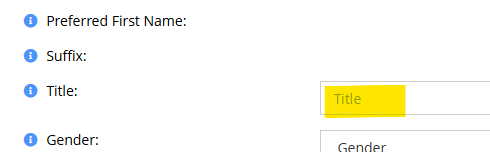
5\. Scroll to the bottom of the page and click "Save"

6\. Your title is now updated!
- [Internal Support](https://hub.talenteverywhere.org/knowledge/internal-support?hsLang=en#main-content)
- [Tutorial](https://hub.talenteverywhere.org/knowledge/internal-support?hsLang=en#tutorial)
- [Membership](https://hub.talenteverywhere.org/knowledge/membership?hsLang=en#main-content)
- [Corporate Premier (HR) Membership](https://hub.talenteverywhere.org/knowledge/membership?hsLang=en#corporate-premier-hr-membership)
- [Professional/Personal (PERC™) Membership](https://hub.talenteverywhere.org/knowledge/membership?hsLang=en#professional-personal-perc-membership)
- [Service Provider Memberships](https://hub.talenteverywhere.org/knowledge/membership?hsLang=en#service-provider-memberships)
- [Membership FAQs](https://hub.talenteverywhere.org/knowledge/membership?hsLang=en#membership-faqs)
- [Education & Learning](https://hub.talenteverywhere.org/knowledge/education-learning?hsLang=en#main-content)
- [GMS Designation](https://hub.talenteverywhere.org/knowledge/education-learning?hsLang=en#gms-designation)
- [CRP Designation](https://hub.talenteverywhere.org/knowledge/education-learning?hsLang=en#crp-designation)
- [CRP/GMS](https://hub.talenteverywhere.org/knowledge/education-learning?hsLang=en#crp-gms)
- [Events](https://hub.talenteverywhere.org/knowledge/events?hsLang=en#main-content)
- [Regional Summit](https://hub.talenteverywhere.org/knowledge/events?hsLang=en#regional-summit)
- [Registration](https://hub.talenteverywhere.org/knowledge/events?hsLang=en#registration)
- [News, Research, & Public Policy](https://hub.talenteverywhere.org/knowledge/news-research-public-policy?hsLang=en)
- [Publications & Subscriptions](https://hub.talenteverywhere.org/knowledge/publications-subscriptions?hsLang=en)
- [Career Center](https://hub.talenteverywhere.org/knowledge/career-center?hsLang=en)
- [Advertising Opportunities](https://hub.talenteverywhere.org/knowledge/advertising-opportunities?hsLang=en)
- [Foundation of Workforce Mobility](https://hub.talenteverywhere.org/knowledge/foundation-of-workforce-mobility?hsLang=en)
- [Get Involved](https://hub.talenteverywhere.org/knowledge/get-involved?hsLang=en)
[](https://www.worldwideerc.org/)
WERC website
Copyright © 2026, WERC